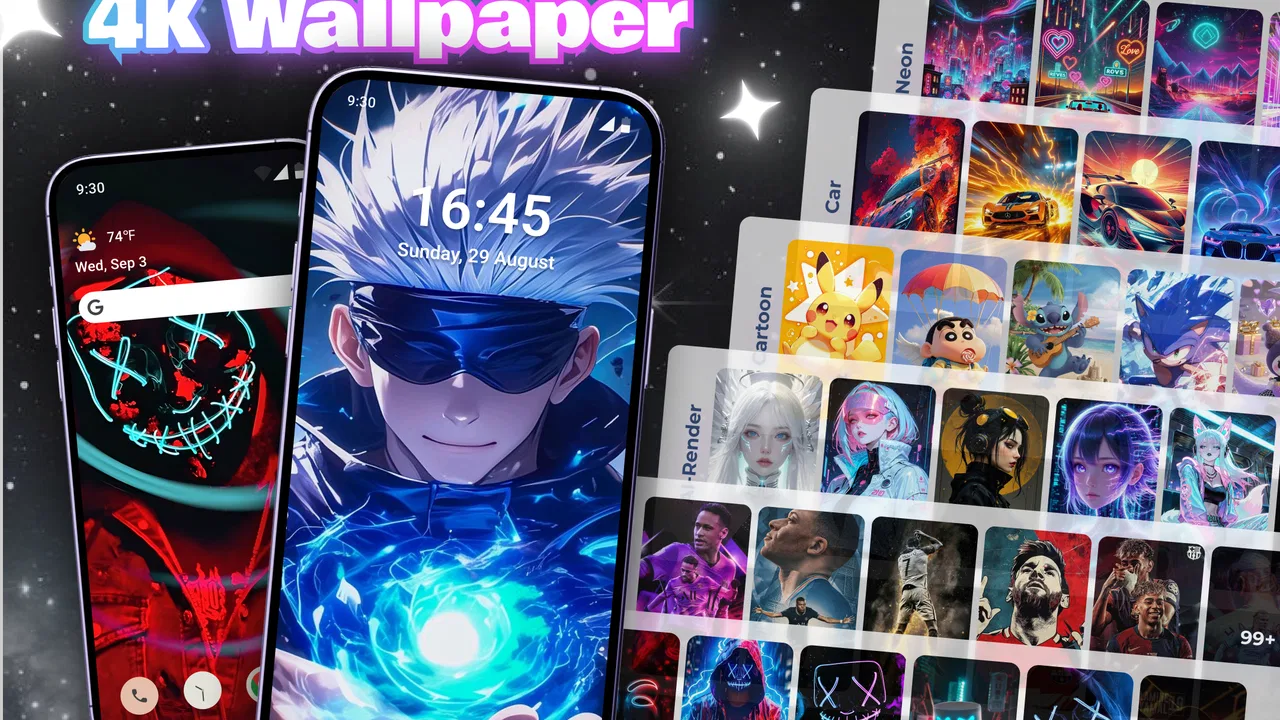
Live Wallpapers & 4K Wallpaper
- 3.5
- Rating
- 5.00M
- Installs
- Free
- Price

 Analysis by App-foxy
I like changing my phone’s background often, but I do not want to spend an evening searching through random image pages, cropping pictures, and repeating the same setup every few days. 4k Wallpaper & Live Wallpapers is aimed at that exact habit. It is a free personalization app from Winnix that brings high-resolution wallpaper browsing, live wallpaper choices, and an option to refresh the look of your phone regularly. After using it, I see it as a convenient discovery tool rather than a complete replacement for every wallpaper source.
The important question is not simply whether the app has attractive images. Most wallpaper apps can make that promise. The better question is whether its daily-refresh approach suits the way you use your phone, whether you prefer still images or motion, and how much control you want over the final result. My experience is that this app is most appealing when you enjoy variety and want the phone to feel a little different without manual effort. It is less convincing for someone who already has a carefully organized personal photo collection or wants extremely precise control over scheduling and image selection.
How I judged the wallpaper experience
I approached it as an everyday personalization app, not as a gallery to admire once and forget. I looked at how useful the browsing experience feels, how practical the automatic refresh idea is, and whether the combination of static and live backgrounds makes sense on a normal phone. I also considered the small decisions that matter after installation: whether I would actually keep the automatic change enabled, whether a background remains readable behind icons, and how much effort is involved when I want to return to a favorite image.
You May Also Like

 Blood Strike: 2.5 Anniversary
Blood Strike’s Loadouts Turn Every Drop Into a Tactical Gamble
A close look at Blood Strike’s custom loadouts: how fast access to signature weapons reshapes its battle royale rhythm, rewards preparation, and narrows the gap between fights.

 Pandora - Music & Podcasts
Pandora’s Music Is Easy to Start, but Harder to Recover
Pandora’s strength is its low-effort path from a seed to a station. Its weak spot is how much confidence it asks you to place in connection, setup, and quiet recovery.

 8 Ball Pool
 Is Built on Rivalries, Rematches, and Routine
A close look at the rivalries, rematches, shared routines, and unanswered safety questions that turn a quick pool match into a persistent mobile community.

 Samsung Music
’s Quiet Strength Is Playing What You Already Own
Its reach comes less from spectacle than from dependable access to a personal library. That simplicity is both the app’s strongest retention engine and its ceiling.

 AccuWeather: Weather Radar
AccuWeather Review: A Quick, Clear Forecast for Everyday Decisions
For everyday plans, the best forecast is the one you can understand quickly. AccuWeather makes rain timing, radar, and local conditions easy to act on, with a few trade-offs.

 Hill Climb Racing
Why Hill Climb Racing Still Turns Crashes Into One More Run
A tiny car, a bumpy hill and one more upgrade: Hill Climb Racing keeps resurfacing because its simple chaos makes every near-miss feel personal.
More From Our News Desk



The app is listed for Android devices running version 7.0 or later, which makes it accessible to people using older phones as well as newer models. Its current version is 2.8.0. It is rated for Teen users, so families should still treat it as an app to review together rather than assuming every visual category will suit every child.
Its audience size also gives some context. The app has passed five million installs and holds an average rating of 3.9 from around six thousand ratings. I would not treat those figures as proof that it is perfect, but they do suggest that the basic idea has found a substantial audience. The rating feels consistent with my impression: useful and attractive for the right user, though not so polished or flexible that every person will want to make it their permanent wallpaper manager.
What the daily-refresh idea changes
A normal wallpaper app usually makes you do the work. You browse, choose a picture, crop it, and set it as the background. That approach gives you control, but it also means the app becomes irrelevant once you have found one image. Here, the promise of a refreshed phone changes the relationship. Instead of treating wallpaper as a one-time decoration, you can use it as a small daily change, similar to rotating a playlist or switching a lock-screen theme.
That sounds simple, but it has a practical trade-off. Surprise is enjoyable only when the replacement is suitable for your screen. A bright, detailed image can make app labels difficult to read. A busy live background may look impressive in a preview but become distracting when you are opening apps repeatedly. I recommend spending a little time identifying the styles you consistently like before relying on automatic changes. If you skip that step, the novelty can turn into daily cleanup.
One useful routine is to use the app for discovery first and automation second. I would browse when I have a few minutes, note which visual styles work with my icon layout, and then enable a refresh pattern only after I know the general look is comfortable. This avoids the common mistake of allowing a new image to change the mood and readability of the entire phone without considering how it will sit behind widgets and shortcuts.
Still wallpapers and live backgrounds are not the same choice
The inclusion of live wallpaper makes the app broader than a simple high-resolution image browser. Motion can make a phone feel more personal, especially on the lock screen or when you enjoy visual effects. It can also be the wrong choice if you prefer a quiet, uncluttered interface. I found it helpful to think of live backgrounds as an occasional mode rather than an automatic upgrade over still images.
A static 4K-style background is usually the safer everyday option. It gives you a detailed image without adding movement to every glance at the phone. Live wallpaper is better when the visual effect itself is the point, such as when you want the device to feel more animated during a short period. The trade-off is not only appearance; motion can make the screen feel busier and may be less comfortable for people who prefer minimal visual stimulation.
I would also avoid judging a live wallpaper solely from its preview. A preview tells you how the scene looks in isolation, but not whether it competes with icons, notifications, or widgets. Before committing, I would check the lock screen and home screen separately. A background that works beautifully behind a sparse lock screen may become confusing under a dense grid of shortcuts.
Where this app is genuinely convenient
The strongest part of 4k Wallpaper & Live Wallpapers is the reduced effort. If I want a fresh appearance without collecting files from several websites, the app gives me a focused place to browse. That is especially useful for people who change phones often, enjoy seasonal visual changes, or become bored with a fixed background but rarely remember to update it manually.
It also works well as a low-commitment personalization tool. I do not have to redesign the whole phone, buy a theme, or reorganize icons. A new background can make an older device feel slightly refreshed while leaving the launcher and apps untouched. That makes the app a sensible choice for someone who wants visible change without learning a complicated customization system.
Another strength is the combination of high-resolution imagery and motion in one app. I can start with a calm still image, try a live option later, and decide which direction suits my habits. This is more convenient than maintaining separate apps for every type of background, particularly if I am still figuring out whether I prefer a clean image or a more animated screen.
Small decisions that improve the result
The first tip I would give is to choose for icon contrast, not just image quality. A very sharp background can still be a poor wallpaper if its brightest details sit directly beneath white labels. When browsing, I look at where the main subject is positioned and whether the empty areas of the image match the places where my icons appear. This is a more useful test than selecting the most dramatic preview.
The second tip is to separate lock-screen and home-screen priorities. The lock screen can tolerate a stronger focal point because it often has fewer elements. The home screen needs calmer areas for icons and widgets. If the app allows you to work with the two screens differently on your device, I would take advantage of that distinction; if your phone applies one choice broadly, I would favor readability over visual drama.
The third tip concerns daily refresh. Automatic change is best when you see it as a source of pleasant variation, not as a promise that every new selection will be ideal. I would keep a favorite ready so I can quickly return to a dependable background after an unsuitable change. That simple habit prevents the refresh feature from becoming a reason to uninstall the app.
A fourth practical insight is to test the app during the part of the day when you normally use your phone most. A dark image that looks elegant at night may feel dull in bright daylight, while a colorful live background can become tiring when you are checking messages repeatedly. Wallpaper is not viewed in a gallery; it is viewed under changing lighting and alongside real tasks.
Where other wallpaper approaches may fit better
The usual alternatives fall into several groups. A personal photo gallery is best if emotional meaning matters more than discovery. It lets you use a family picture, a travel memory, or a photograph you took yourself, and it avoids the feeling that your phone is choosing its identity for you. I would choose that route for a phone that needs to feel personal rather than constantly refreshed.
A built-in phone wallpaper picker is better for simplicity. It is already available, generally fits the device’s screen well, and does not require another app for a task the operating system can handle. If you only change your wallpaper a few times a year, 4k Wallpaper & Live Wallpapers may offer more variety than you need. The extra browsing space is valuable mainly when you actively want new visual ideas.
Dedicated live-wallpaper apps may suit users who care about one particular motion style. They can be preferable when a person wants a narrowly focused collection rather than a mixed experience that includes both still and animated backgrounds. I would look elsewhere if the exact animation behavior matters more to me than having a broad wallpaper catalog.
Theme and launcher tools are another category entirely. They can change icons, layouts, colors, and widgets along with the background. That is the better direction for someone seeking a coordinated redesign. This app is more restrained: its appeal is that it can change the visual atmosphere while leaving the rest of the phone alone. I prefer that restraint, but it also means it will not satisfy someone expecting a full interface makeover.
Finally, manual image sources offer more control over licensing choices, cropping, and personal organization, but they require more work. The convenience of this app comes from reducing those steps. If I want to curate every image myself, I would accept the extra effort elsewhere. If I want a quick stream of possibilities, this app makes more sense.
What switching to it really involves
Moving from a normal wallpaper routine is not technically difficult, but there is a small mental cost. I have to decide whether I want the app to be a place I visit occasionally or a source of ongoing change. Those are different habits. Occasional browsing is easy to control; automatic refresh asks me to accept that the phone may look different without my approval each time.
The cost is also measured in attention. A new wallpaper can be fun, but browsing can become another endless scrolling activity if I keep searching for a perfect image. I found the experience more rewarding when I set a clear goal, such as finding a dark background for better icon visibility or choosing a calm image for workdays. Without a purpose, the large variety can make choosing harder rather than easier.
There is also a storage and performance judgment to make, especially with live backgrounds. I would start with still images and use motion selectively if I notice that the animated option makes the phone feel less responsive or less comfortable. I am not treating that as a guaranteed problem on every device; it is simply a sensible way to keep the experience aligned with how the phone is actually used.
The app is free, which lowers the barrier to trying it. That matters because wallpaper preference is personal and difficult to predict from screenshots. I can install it, test a few styles, and decide whether the daily-refresh concept fits my routine without making it a major purchase decision. The real commitment is not money; it is whether I want another personalization app involved in the way my screen changes.
Who should try it, and who should skip it
I would recommend it to someone who changes visual tastes often, enjoys discovering new backgrounds, or wants a simple way to make a familiar phone feel less static. It is particularly suitable for people who like the idea of a fresh image but do not want to search manually every morning. The mix of still and live choices gives curious users room to experiment before settling into a routine.
I would also suggest it to someone setting up a new phone who wants an attractive starting point without spending time organizing personal images. It can provide a quick visual identity while the rest of the device is being configured. For a teenager or adult who enjoys expressive customization, the Teen content rating is worth keeping in mind when deciding whether it is appropriate for a shared or supervised device.
I would skip it if I already have a carefully maintained wallpaper collection and rarely want outside suggestions. I would also look for a more comprehensive theme tool if my real goal is to change icons, widgets, and launcher behavior. People who dislike motion, visual variation, or automatic changes may be happier with one dependable image selected from the phone’s own gallery.
My balanced view is that the app succeeds by making wallpaper change feel easy, but ease is not the same as precision. It is strong for discovery and casual refreshes. It is less compelling for strict curation, personal-photo use, or full interface customization. Knowing that distinction before installing it prevents disappointment.
My recommendation after using it
4k Wallpaper & Live Wallpapers is worth trying if your main decision is between a stale screen and a little daily variety. I appreciate that Winnix keeps the focus on personalization rather than asking me to rebuild the whole phone. The free price makes experimentation straightforward, and the combination of high-resolution still backgrounds with live options gives the app more range than a basic picker.
I would begin conservatively: choose a readable still image, check it behind the icons and widgets, and only then explore live backgrounds or automatic refresh. That workflow gives me the benefits of the app without surrendering control too quickly. It also makes it easier to identify whether I genuinely enjoy changing the screen or merely enjoy browsing previews.
My final recommendation is therefore positive but specific. Use it as a wallpaper discovery and refresh companion, not as a complete customization suite. If you want your phone to surprise you occasionally and you are willing to keep an eye on readability, it can become a pleasant part of your routine. If you want absolute control, a personal gallery or the phone’s built-in picker will probably serve you better. For me, the app earns a place on the device when I want visual variety with minimal effort, provided I remain selective about what I actually set.
FAQs for Live Wallpapers & 4K Wallpaper
01What is 4k Wallpaper & Live Wallpapers and how does it work?
4k Wallpaper & Live Wallpapers is an app that offers a vast collection of high-resolution wallpapers and animated backgrounds for your device. Users can easily browse through categories, preview wallpapers, and set them as their home or lock screen background with a few taps, enhancing device aesthetics.
02Are the wallpapers in 4k Wallpaper & Live Wallpapers truly 4k quality?
Yes, the app provides wallpapers in 4k resolution, ensuring crisp and vibrant images. This high-resolution quality means that the wallpapers look stunning on most modern devices, providing clear and detailed visuals without blurring or pixelation, even on larger screens.
03Does 4k Wallpaper & Live Wallpapers consume a lot of battery or data?
While static wallpapers have minimal impact on battery and data usage, live wallpapers may consume more resources. However, the app is optimized to minimize energy consumption. Users can also select to download wallpapers only on Wi-Fi to manage data usage effectively.
04Is 4k Wallpaper & Live Wallpapers free to use, or does it require a subscription?
The app offers a free version with access to a wide selection of wallpapers. However, there may be premium features or exclusive content available through a subscription or one-time purchase. Free users can still enjoy a substantial range of high-quality images without cost.
05How frequently is new content added to 4k Wallpaper & Live Wallpapers?
New content is added regularly, with fresh wallpapers and live animations updated weekly or monthly. This ensures that users always have access to the latest trends and seasonal themes, keeping their device backgrounds exciting and up-to-date.
Pros
- High-resolution images enhance screen clarity.
- Variety of categories to suit all tastes.
- Regular updates keep content fresh.
- User-friendly interface for easy navigation.
- Battery-friendly live wallpapers.
Cons
- Ads can be intrusive at times.
- Limited customization options.
- Some images require a premium upgrade.
- May consume data with frequent downloads.
- Live wallpapers can drain battery faster.

Live Wallpapers & 4K Wallpaper
Gallery